Use the camera to judge a parking approach
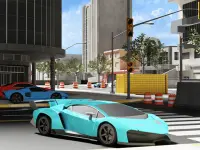
Park Perfect: Car Simulator makes spatial judgment part of a precise parking task. You drive past cones, bends and speed bumps, then stop inside the yellow slot between parked cars. The car must remain still in the slot to finish. Contact with a cone, barrier or another vehicle ends the attempt.
The C key switches between the available camera views. Use that choice to answer a question: do you need a clearer view of the route ahead or the car's position relative to the slot? The most dramatic angle is not necessarily the most useful one for a tight manoeuvre. Look at the car's corners and the remaining clearance before moving again.
W or the up arrow moves forward, S or the down arrow reverses, A/D or the side arrows steer and Space brakes. A careful approach gives those inputs distinct purposes. Brake before a difficult bend, align for the slot and use reverse to make room when necessary. Trying to fix an uncertain angle with constant forward movement can reduce your available space.
Read distance from a first-person viewpoint
In Eggcavation, the camera follows your first-person view around a giant egg. You strike its surface, collect shards and sell them at a terminal. Movement and looking are separate inputs, so first learn how to place the target area comfortably in view without losing track of the route to the selling point.
On desktop, WASD moves, the mouse looks and holding the left button strikes. The mobile layout provides its own movement and look areas. Concentrating hits on the same spot can anger the egg until it wakes and throws you. The visible response therefore matters as much as reaching a convenient striking position.
Deeper layers and upgraded tools expand the excavation cycle. Before changing equipment, notice whether the current difficulty is reaching a useful area, collecting what you have removed or completing the return trip. The fact that a tool appears more powerful does not replace the need to understand the route and the work it is meant to improve.
Resolve an unclear view before adding speed
These examples use depth differently. Park Perfect asks you to place an entire vehicle inside a boundary without contact. Eggcavation asks you to orient yourself around a work surface and a collection routine. In either case, an awkward view can masquerade as a control problem. If you cannot explain where the next action should end, inspect the space again before acting faster.
For a useful first attempt, choose one spatial question. Check how much room the parked car needs during a turn, or how the egg's surface sits relative to your aim. Keep that observation specific. Broadly deciding that a game is “hard to control” gives you less to work with than noticing that one camera angle hides a boundary.
Choose a different reason to move through space
The Adventure category offers another browsing route when you want movement to serve a larger journey. Check the chosen game's own controls and objective; three-dimensional presentation does not guarantee exploration, combat or a particular device layout. Let the task determine your first goal, then use the camera to make that goal easier to read.
Depth becomes easier to judge when you compare it with a known object or boundary in the scene. Use the slot lines around a car or the surface directly under your aim as a reference. Then check the result of a small movement before making a larger correction.