Build a picture one connection at a time
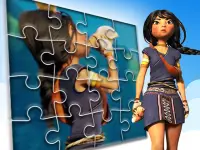
Kayara Jigsaw Puzzle Online gives the collection a concrete option for visual assembly. The opening image selection shows a grid of pictures, with the first available and the others marked by locks. Selecting the first picture leads to a set of shaped jigsaw pieces. Parts of a character, clothing and a warm stone-coloured background provide details you can compare as you assemble the scene.
Begin with a connection you can explain. Look for two parts of the same arm, a line that continues through a garment or a clear change between the character and the background. Compare the picture detail and the shape of the joining edges. A similar colour is a useful clue, but it is less convincing than a line that continues naturally across both pieces.
Drag a candidate toward the area where you think it belongs and inspect the result. If two fragments do not form the detail you expected, keep that information for the next comparison. Repeatedly pushing the same piece into the same place without reconsidering the picture is unlikely to reveal a new connection.
Leave enough visible space to recognise the remaining pieces. When several fragments overlap, a useful edge or a small feature can become difficult to compare. Work on a recognisable group, then look at what could extend it. Building from a clear detail gives you a growing reference instead of a collection of unrelated guesses.
Choose a useful pace for a mixed collection
A jigsaw lets you examine the current arrangement before making the next placement. Other entries in Fungames have different names and themes, so check their starting screens rather than assuming the same pace or controls. Decide whether you want to spend time comparing details or whether you would prefer a game with a different kind of action.
For another picture-based option, Abby Hatcher Jigsaw Puzzle includes a faint reference image and a choice of difficulty. That reference changes how you search: you can compare a fragment with a visible destination as well as with neighbouring pieces. Choosing an easier setting can help you learn the picture before trying an arrangement with more to keep track of.
For a different kind of search, Super Word Search Game replaces picture fragments with a letter grid. You choose a difficulty and look for the requested words. It suits a session in which recognising a sequence matters more than judging the outline of a jigsaw piece. Change your scanning habit when you switch between those two tasks.
Let the game explain its own tools
Before relying on a pause control, a locked picture or a next-scene button, look at what it actually does in the current title. Do not assume that a feature available in one entry belongs to all eight. The collection label does not establish a shared save system, an online competition or one control scheme.
The Arcade category offers a broader route when you want to continue browsing beyond this small selection. Keep the reason for changing games clear: perhaps you want less visual searching, a different rhythm or another objective. That makes the next choice easier to evaluate than opening several unfamiliar titles while expecting each one to provide the same experience.