Weekend Sudoku 24
2 plays

Weekend Sudoku 24
About Weekend Sudoku 24
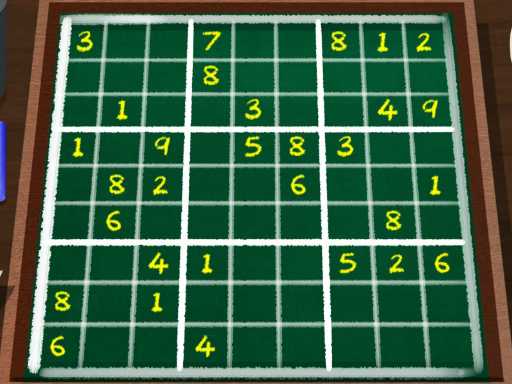
Weekend Sudoku 24 brings classic number logic to your browser with a fresh challenge. This free puzzle game asks you to fill a 9x9 grid, testing your focus and patience as numbers fly across the screen. It captures that old-school brain teaser feel while keeping you hooked with a simple goal: beat your high score and complete the puzzle perfectly.
Highlights
The game centers on a puzzle game experience where you fill a grid with numbers 1 through 9, ensuring no repeats in any row, column, or 3x3 box. Its simple, click-and-type interface makes it accessible for a quick mind jog, though the basic visuals keep the focus squarely on the logic. The challenge lies in avoiding mistakes that can spoil your progress, making it a true test of pattern recognition and strategic placement.
Quick Questions
How do I play Weekend Sudoku 24?
You click a cell with your mouse and type a number from 1 to 9. The goal is to fill the entire 9x9 grid so that every row, column, and mini-section contains all digits without repeating any.
What are the controls for this game?
Use your mouse to select cells and the keyboard to input numbers. Arrow keys move your selection, and a right-click can clear a cell if you make a mistake.
Is Weekend Sudoku 24 good for practice?
Yes, it serves as great preparation for logic skills. The game tests your focus and pattern recognition, making it a useful tool for sharpening your brain through repetitive puzzle-solving.
Can I play this like classic grandpa Sudoku?
Absolutely. It follows the same traditional rules of Sudoku, offering that familiar, old-school brain-teaser feel in a modern browser format that's easy to access and play.
How It Works
Start by clicking any empty cell on the grid. Use your keyboard to type a number between 1 and 9. Ensure your placement follows Sudoku rules: no repeated numbers in any row, column, or 3x3 section. The game includes a timer, so you can try to beat your own best time as you fill in every blank spot correctly.
Helpful Advice
Focus on one row or box at a time to avoid confusion. Use the right-click to clear errors quickly. Remember that patience is key, and rushing often leads to mistakes that can ruin your entire grid.